This site uses cookies. By using it, you agree to their use. To find out more, read our Privacy Policy.
Accept
Wrexham Council NewsWrexham Council NewsWrexham Council News
  • Biz & education
  • Council services
  • People & place
  • Events
  • Video
  • Other
  • Welsh
Reading: Use this little button to translate, read and listen to information more easily…
Share
Notification Show More
Wrexham Council NewsWrexham Council News
Search
  • Biz & education
  • Council services
  • People & place
  • Events
  • Video
  • Other
  • Welsh
Follow US
© 2023 Cyngor Bwrdeistref Sirol Wrecsam
Wrexham Council News > Blog > Council services > Use this little button to translate, read and listen to information more easily…
Council services

Use this little button to translate, read and listen to information more easily…

Last updated: April 21, 2023 11:16 am
Share
3 Min Read
ReachDeck screen reader
SHARE

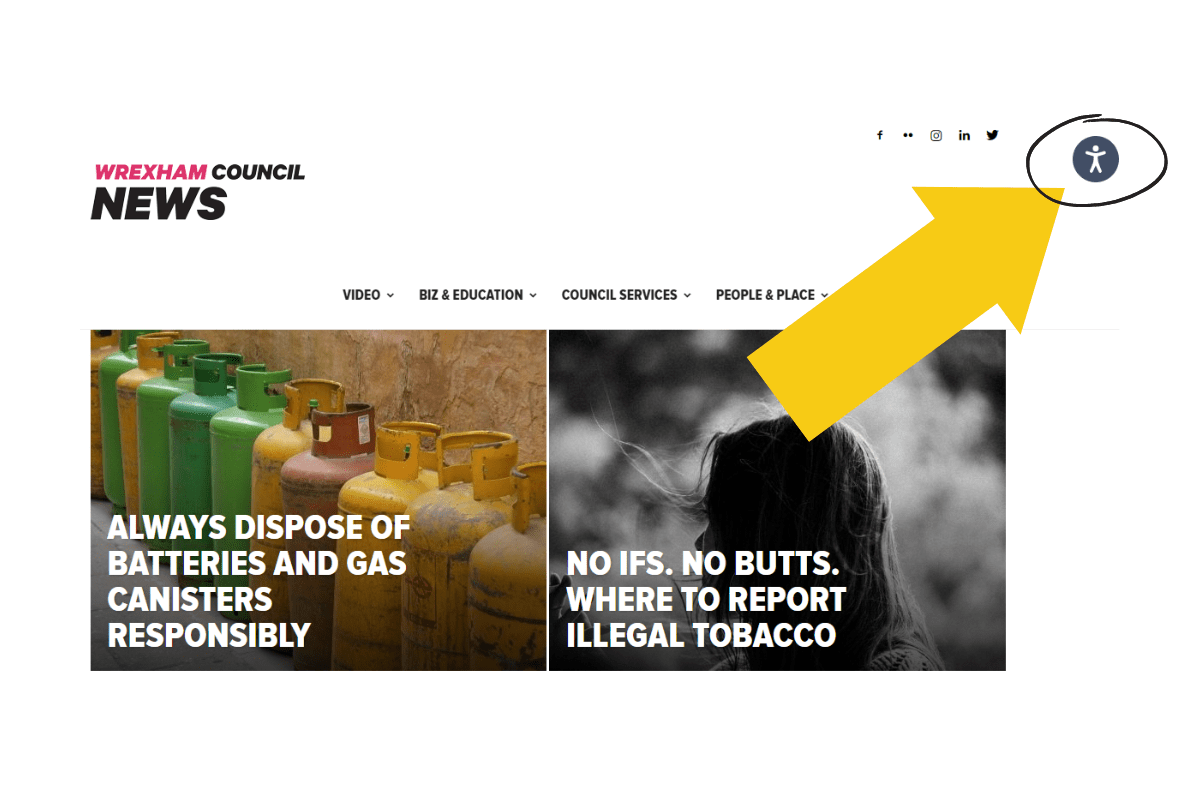
You may have noticed this little icon in the top right-hand corner of Wrexham Council’s website and news blog recently (it looks like a person doing a star-jump).

Content
  • Try it out
    • Translate text
    • Listen to text
    • Enlarge text
  • Why is this important?
  • Tell your friends and family

The ReachDeck icon

So what does it do?

We’re pleased to announce we’ve added translation, reading and speech support with the ReachDeck toolbar – helping to make online information about council services more available to everyone.

Try it out

Click or tap on the little icon. This will launch the ReachDeck toolbar along the top of your screen.

Translate text

ReachDeck translate icon

To translate text, click on the square ‘A’ icon and then select the language you want from the dropdown list.

Until now we’ve only shared information in Welsh and English, but you can now read our web-pages in pretty much any language – including Polish, Portuguese and Ukrainian.

Listen to text

ReachDeck listen icon

To hear text read aloud, simply click on the ‘finger’ icon (it looks like a finger tapping a button) and hover your mouse over any text. From a touchscreen device you’ll have to click on the text to hear it.

You can also select any text on the page and download it as an MP3 file (using the ‘MP3’) icon so you can listen to it later.

Enlarge text

Use this little button to translate, read and listen to information more easily…

If you click on the round ‘magnifying glass’ icon (with an ‘A’ in the middle), the text will be enlarged when it’s read aloud.

ReachDeck help icon

To explore more, click on the question mark (?) icon to discover what each feature on the toolbar does.

Why is this important?

Councillor Paul Roberts, Lead Member with responsibility for community cohesion and equality, says:

“A person with a visual impairment might struggle to read text, and someone with a cognitive disability might find it difficult to read information on a crowded web page.

“Language can also be a barrier, and in a diverse community it’s important to make information available in as many languages as possible…so I’m really pleased we’ve been able to adopt this technology.”

Councillor Beverley Parry-Jones, Lead Member with responsibility for ICT and customer services, says:

“Visitors to our website and news blog can now choose to have content read aloud, remove distracting content and translate our web pages into over 100 languages.

“The ReachDeck toolbar will help ensure everyone can access the same information and services online, so please help spread the word.”

Tell your friends and family

So if you know someone who doesn’t speak Welsh or English, or struggles to read text on screen because of an impairment, let them know about this clever little feature we’ve added to our website.

Encourage them to give it a try.

Share
Previous Article Jobs Growth Wales Looking to earn money, find independence and get on the career ladder?
Next Article Tour of Britain 2023 World-class cycling returns to Wrexham this year

Stay connected

20KFollowersLike
23KFollowersFollow
3.8KFollowersFollow
8.4KFollowersFollow
- Sign up -
Ad image

Latest news

Guildhall
Wrexham Council responds to recent media coverage on Llwyneinion and the adjacent Monsanto waste tip
Other
August 14, 2026
Have your say on the future of bus services in Wrexham
Council services Decarbonising Wrexham
August 14, 2026
Students at The Maelor School, Penley, celebrating their A Level results today! (13.8.26)
A-Level results day 2026 – Llongyfarchiadau to all our students
Biz & education Other People & place
August 13, 2026
New matchday travel for Wrexham AFC supporters
People & place Decarbonising Wrexham
August 12, 2026

You might also like

Press Statement from Councillor David A Bithell - Capital Works Programme 2026/27
Council services

Press Statement from Councillor David A Bithell – Capital Works Programme 2026/27

August 12, 2026
Customer Access Survey
Council services

There’s not long left to have your say on our services

August 11, 2026
Wrecsam2029 presses play on bid submission for Wrexham to become the first Welsh UK City of Culture
VideoCouncil servicesPeople & place

Wrecsam2029 presses play on bid submission for Wrexham to become the first Welsh UK City of Culture

August 7, 2026
Small fire, serious danger: warning after incidents at country parks
Council services

Small fire, serious danger: warning after incidents at country parks

August 5, 2026
//

Wrexham Council News provides all the latest news from your county borough council.

Get our top stories…

Subscribe to our newsletter to get latest news and info from Wrexham Council.

Sign up

Quick links

  • Customise interests
  • Reading list
  • MyUpdates
  • Contact the council
  • Privacy policy
Wrexham Council NewsWrexham Council News
Follow US
© 2026 Wrexham County Borough Council
Wrexham Council News
Welcome back!

Sign in to your account

Username or Email Address
Password

Lost your password?

  • Cymraeg
  • English